

Introduction#
This article is the first article in a series covering the thought process, design, challenges, and final product of creating my personal portfolio site. Click the dropdown at the top or bottom of the article to explore the other entries in this series.
In this article I give a general overview of the technologies used and the workflow behind the website. Explore the other articles to learn more about the design requirements and build process of the website.
While the end product provides great value in promoting my personal brand and providing a platform to showcase my skills, this project was also valuable as an opportunity to practice the engineering design process.
Technologies used#

html and css files. Written in Go, HUGO is also incredibly fast at rebuilding the website when making changes to the content or the template. Unlike dynamic sites, static sites remove the need for a database which subsequently increases security by reducing the attack surface.


I chose Cloudflare as my registrar as I found their pricing to be the most transparent and cost-effective in the long term. While purchasing my domain from Cloudflare limits my choice of nameserver to Cloudflare’s nameservers, this is not an issue as Cloudflare supports all the features that I would want such as DNSSEC. In addition, having Cloudflare as my registrar and web host made setup very convenient as the DNS records were automatically generated by Cloudflare as I was configuring the web hosting.
Workflow#
One of the key ideas behind the portfolio website was to easily write or edit articles on my website without having to manage the hosting configuration or the code of the website.
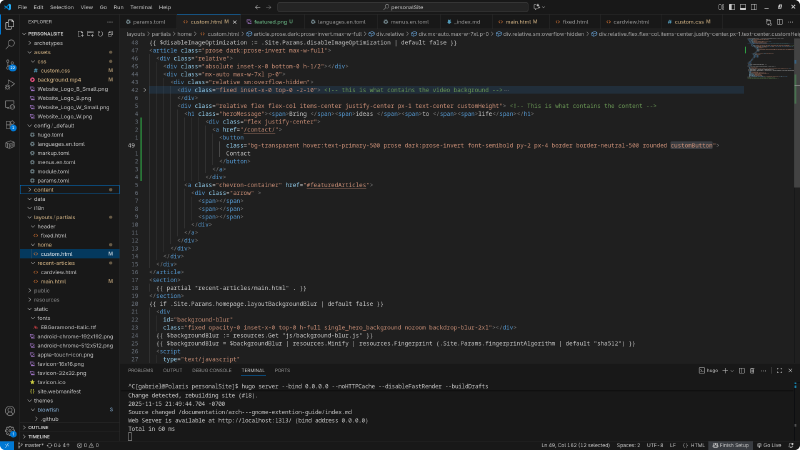
This led me to develop a custom workflow that integrated into the static site generation.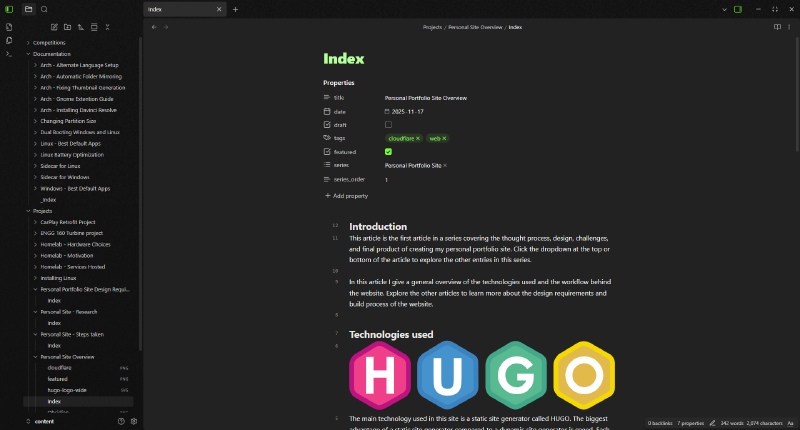
content directory from the folder tree of my website as an Obsidian vault.
Once articles are written, I create a commit to my local git repository. Before publishing and while writing I can also preview how my articles will look on my website using the HUGO development server.
After I am ready to publish my changes to the production site, I push my changes to the remote repository hosted on GitHub. The changes are then automatically detected by the Cloudflare Worker that I set up. The Cloudflare worker runs the HUGO site generation, converting all the markdown articles into beautiful markup, and the updated site is published live at gabrielbaltazart.ca